Syncing (AWS & PPO Models Only)
AWS and PPO models have a more robust calculation engine that runs on Spark. For Spark to run the calculations, there are two types of syncing between the DataBase server, detailed below.
Comp chart

Sync-forward
When a calculation is started, all net new data loaded into Varicent tables will be sync’d to either S3 (AWS) or COS (IBM). This is the storage layer where Spark processes the calculations. This is shown as Step 1 in the above image.
Note
The first calculation when a model is restored to a new environment will need to initialize all data and may take longer in a large model. Subsequent calculations will be incrementally synced much faster.
Sync-back
While Spark processes the calculation results, some results will sync back to the DB server. This is shown as Step 3 in the above image. Workers 10-19 in this example are sync back threads whereas 0-9 are the actual calculation threads.
The following objects will force a calculation to sync back:
Calculations used by:
Reports
Publications
Data Stores & Views
Report Data Models (RDM)
When locking a calendar, all calculations using that calendar will sync back to the DB server for the periods that are being locked.
Best Practices for reducing sync-back time:
Ensure you are locking as frequent as possible, locked results will no longer need to sync back during your normal processing.
Clean up unused objects that may trigger a sync back (e.g., Data Store that isn’t used by any reports)
If the calculation feeds a view or data store that has additional filtering, consider creating a NEW calc that does the filtering first. For example:
Calc A takes 20 minutes to sync back and produces 100M rows.
Calc A is only used by a View that filters the 100M rows to current month.
Create a NEW calc that filters Calc A to current month and replace the view source with the new calc. This means Calc A will no longer need to sync back and only the smaller current month calculation will sync back.
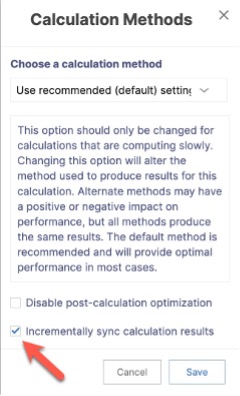
Consider using the “Incremental Sync Back” option for calculations that take longer than 10+ minutes to sync back. This option adds slightly more overhead to the queries, but it will identify the delta from the previous run and only sync back the changes needed. This option is especially powerful for calculations that don’t have a large number of rows changing each day. This can be set at the individual calculation level by clicking the calulation and then selecting “Choose Calculation Method” in the context menu. The popup will have an option to “Incrementally sync calculation results”